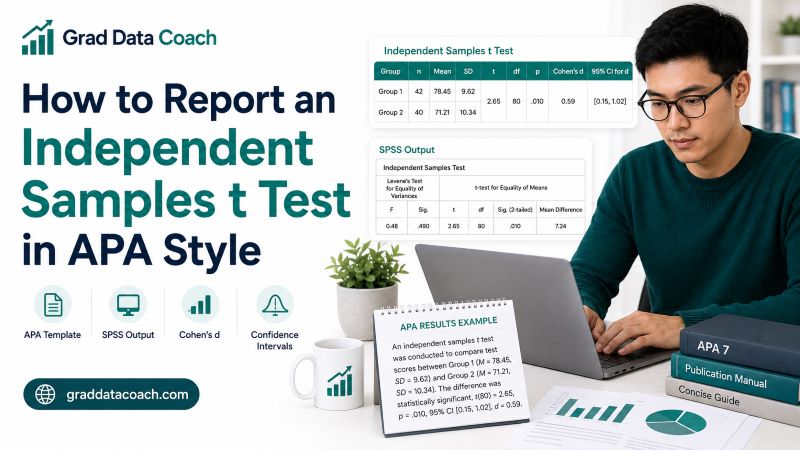
An independent samples t test compares the means of two separate groups. Once you run the test, you still need to present the result clearly so readers can understand what you compared, how the groups differed, and whether that difference was statistically significant.
This guide explains how to report an independent samples t test in APA style step by step. You will learn which statistics to include, how to format the test result, how to report significant and nonsignificant findings, and how to use an APA reporting template. We will also cover Cohen’s d, confidence intervals, SPSS output, APA tables, and common reporting mistakes.
By the end, you should be able to turn your own t-test output into a clear APA-style results paragraph.
What Is an Independent Samples t Test?
An independent samples t test compares the mean of a numerical outcome between two separate groups.
For example, you might use the test to compare:
- Exam scores for students taught using two teaching methods.
- Stress scores for full-time and part-time students.
- Blood pressure for a treatment group and control group.
- Satisfaction scores for two customer groups.
- Test scores for students who received tutoring and those who did not.
The two groups must be independent. This means that each participant or observation belongs to only one group.
Suppose a researcher wants to determine whether students who receive guided study support achieve different exam scores from students who use a standard study method. Study method is the grouping variable, while exam score is the numerical outcome.
The t test evaluates whether the difference between the two sample means is large enough, relative to the variation in the data, to provide statistical evidence of a difference between the groups.
Before reporting the result, you should first make sure that an independent samples t test is suitable for your research question and data.
What Should You Report in APA Style?
A good APA-style t-test result gives the reader enough information to understand both the observed group difference and the statistical evidence.
You will usually report:
- The test performed. State that you conducted an independent samples t test and explain what you compared.
- Group means. Report the average outcome for each group using M.
- Standard deviations. Report the spread of scores within each group using SD.
- t statistic. Report the calculated t-test value.
- Degrees of freedom. Place the degrees of freedom in parentheses immediately after t.
- p value. Report the exact p value when appropriate.
- Effect size. Cohen’s d is commonly used to describe the size of the group difference.
- Confidence interval. A 95% confidence interval can show the precision of the estimated difference.
The result should also make the direction of the difference clear. Readers should not have to calculate which group had the higher mean themselves.
APA Format for an Independent Samples t Test
The basic statistical format is:
t(df) = t value, p = p value
For example:
t(60) = 3.14, p = .003
However, this alone does not tell readers which groups were compared or how their scores differed. A complete APA-style report should place the test statistic within a meaningful sentence.
For example:
An independent samples t test was conducted to compare exam scores between students receiving guided study support and students using the standard study method. Students in the guided study group (M = 78.40, SD = 6.20) scored significantly higher than students in the standard study group (M = 73.10, SD = 7.10), t(60) = 3.14, p = .003.
If you are also reporting an effect size and confidence interval, you can add:
d = 0.80, 95% CI [1.92, 8.68].
Beginning with the test that was performed gives the reader immediate context before you present the numerical result.
Independent Samples t Test APA Reporting Template
A useful reporting approach is to begin by naming the test and explaining what you compared. You can then report the group statistics before giving the test result.
Use this general template:
An independent samples t-test was conducted to compare [outcome variable] between [Group 1] and [Group 2]. [Group 1] had a mean [outcome] of [M] (SD = [SD]), while [Group 2] had a mean of [M] (SD = [SD]). The difference was [statistically significant/not statistically significant], t(df) = [t value], p = [p value], d = [effect size], 95% CI [lower, upper].
Replace the information in brackets with values from your own analysis.
For a significant result:
An independent samples t-test was conducted to compare [outcome] between [Group 1] and [Group 2]. [Group 1] (M = [mean], SD = [SD]) had significantly [higher/lower] scores than [Group 2] (M = [mean], SD = [SD]), t(df) = [t value], p = [p value], d = [effect size], 95% CI [lower, upper].
For a nonsignificant result:
An independent samples t test was conducted to compare [outcome] between [Group 1] and [Group 2]. The difference between [Group 1] (M = [mean], SD = [SD]) and [Group 2] (M = [mean], SD = [SD]) was not statistically significant, t(df) = [t value], p = [p value], d = [effect size].
APA Symbols and Formatting Rules
APA style uses standard statistical symbols throughout quantitative results. Using them consistently makes your report easier to read.
| Statistic | Symbol |
|---|---|
| Mean | M |
| Standard deviation | SD |
| t statistic | t |
| Probability value | p |
| Sample size | n |
| Cohen’s effect size | d |
| Degrees of freedom | df |
| Confidence interval | CI |
Keep these formatting rules in mind:
- Italicize M, SD, t, p, and d.
- Do not italicize numbers or mathematical signs.
- Leave a space on each side of the equals sign.
- Write t(60), not t (60).
- Do not place a leading zero before p values.
- Write p = .024 rather than p = 0.024.
- Report p < .001 when software displays .000.
- Keep the leading zero for Cohen’s d, such as d = 0.80.
You do not need to italicize the abbreviation CI or the letters df.
Step-by-Step APA Reporting Example
Suppose a researcher wants to determine whether guided study support improves exam scores.
The descriptive statistics are:
| Group | n | M | SD |
|---|---|---|---|
| Guided study | 32 | 78.40 | 6.20 |
| Standard study | 30 | 73.10 | 7.10 |
The independent samples t test gives:
- t = 3.14.
- df = 60.
- p = .003.
- Cohen’s d = 0.80.
- Mean difference = 5.30.
- 95% CI [1.92, 8.68].
Now report the result in a logical order:
An independent samples t-test was conducted to compare exam scores between students receiving guided study support and students using the standard study method. Students in the guided study group (M = 78.40, SD = 6.20) achieved significantly higher exam scores than students in the standard study group (M = 73.10, SD = 7.10), t(60) = 3.14, p = .003, d = 0.80, 95% CI [1.92, 8.68].
This sentence tells the reader what was tested, which group scored higher, and how strong the statistical evidence was.
How to Report a Significant Independent Samples t Test
When the p value is below your chosen significance level, such as α = .05, you can describe the difference as statistically significant.
Start by stating the test and the comparison:
An independent samples t test was conducted to compare exam scores between the guided study and standard study groups.
Next, describe the groups and report the test:
Students in the guided study group (M = 78.40, SD = 6.20) scored significantly higher than students in the standard study group (M = 73.10, SD = 7.10), t(60) = 3.14, p = .003, d = 0.80.
This wording is better than simply writing, “There was a significant difference between the groups.” Readers should be able to see which group had the higher mean and what outcome was compared.
You can also include a confidence interval if required or useful.
Most importantly, do not interpret statistical significance as proof that the grouping variable caused the difference unless your research design supports a causal conclusion.
How to Report a Nonsignificant Independent Samples t Test
A nonsignificant result should still be reported fully. A p value greater than .05 does not mean that the analysis failed.
Suppose the results are:
- Group 1: M = 4.12, SD = 0.65.
- Group 2: M = 4.01, SD = 0.71.
- t(56) = 0.61.
- p = .542.
- d = 0.16.
You could write:
An independent samples t test was conducted to compare research confidence between Group 1 and Group 2. The difference between Group 1 (M = 4.12, SD = 0.65) and Group 2 (M = 4.01, SD = 0.71) was not statistically significant, t(56) = 0.61, p = .542, d = 0.16.
Notice the wording “was not statistically significant.”
Avoid saying that there was “no difference” because a nonsignificant test does not prove that the population means are identical. It simply means the analysis did not provide sufficient statistical evidence of a difference at the chosen significance level.
How to Read an Independent Samples t Test in SPSS
SPSS normally produces two tables that are especially important for reporting an independent samples t test.
The Group Statistics table provides:
- Sample size for each group.
- Mean for each group.
- Standard deviation for each group.
- Standard error of the mean.
For APA reporting, you will usually take n, M, and SD from this table.
The Independent Samples Test table provides:
- Levene’s test.
- t statistic.
- Degrees of freedom.
- Significance or p value.
- Mean difference.
- Standard error of the difference.
- Confidence interval for the difference.
Do not paste the entire SPSS output table into your dissertation or research paper. Instead, take the values that are relevant to your analysis and present them clearly in your own sentence or APA-style table.
If your output contains several columns and you are unsure which ones matter, focus first on the means, standard deviations, t, df, p, effect size, and confidence interval where appropriate.
Book a 1:1 Session to Work Through Your Statistical Output →
Which SPSS Row Should You Use?
The Independent Samples Test table in SPSS usually contains two rows:
- Equal variances assumed.
- Equal variances not assumed.
The first row corresponds to the traditional pooled-variance independent samples t test. The second uses an unequal-variance adjustment and is commonly associated with Welch’s t test.
Your choice should follow the statistical method appropriate for your data rather than whichever row gives the smaller p value.
If you use the unequal-variance result, the degrees of freedom may contain decimal places. This is normal because Welch’s method adjusts the degrees of freedom.
For example:
t(54.37) = 2.68, p = .010
Report the adjusted degrees of freedom rather than rounding them to a whole number simply because standard t tests often use integer df values.
If you are using SPSS for a dissertation or thesis, your supervisor may also expect you to explain how you evaluated the equality-of-variance assumption.
Do You Need to Report Levene’s Test?
Levene’s test provides information about whether the variability in the two groups is similar. SPSS includes it automatically in the Independent Samples Test output.
Whether you need to report Levene’s test depends on the requirements of your assignment, dissertation, journal, or supervisor.
If the assumption check is important to your report, mention it briefly and then move to the main t-test result. The t test should remain the focus because it answers your research question about the difference between the group means.
Avoid filling your results section with every number from the Levene’s test output unless those values are needed.
More importantly, do not choose between the two SPSS rows simply because one produces a statistically significant result. The decision should follow your statistical approach and the assumptions you are using.
If equal variances are not appropriate, an unequal-variance procedure such as Welch’s t test may be a better choice.
How to Report Cohen’s d
Statistical significance tells you whether the observed difference provides statistical evidence against the null hypothesis. However, it does not tell you how large the difference is.
Cohen’s d provides a standardized measure of the difference between two group means.
For example:
t(60) = 3.14, p = .003, d = 0.80.
Traditional guidelines sometimes describe:
- Around 0.20 as a small effect.
- Around 0.50 as a medium effect.
- Around 0.80 as a large effect.
These values are useful as rough reference points, but they should not be treated as universal rules. An effect that is small in one field may still have practical importance, while a larger effect may have limited importance in another context.
Therefore, interpret Cohen’s d alongside the group means, confidence intervals, research context, and existing literature.
Reporting both p and an effect size gives readers a much clearer picture than statistical significance alone.
How to Report a 95% Confidence Interval
A confidence interval provides information about the precision of the estimated group difference.
In our example, the mean difference was 5.30 points and the 95% confidence interval was [1.92, 8.68].
You could write:
Students in the guided study group scored an average of 5.30 points higher than students in the standard study group, 95% CI [1.92, 8.68].
You can then report:
t(60) = 3.14, p = .003, d = 0.80.
The confidence interval adds information that the p value alone cannot provide. It gives readers a range of values that are reasonably compatible with the estimated population difference under the statistical model.
When you report a confidence interval, make it clear what the interval represents. In an independent samples t test, SPSS commonly provides a confidence interval for the difference between the two group means.
Do not report a pair of confidence limits without enough context for the reader to understand what they refer to.
How to Report the Direction of the Difference
The sign of the t statistic depends partly on the order in which the two groups are compared.
Suppose Group 1 has a higher mean than Group 2. If the software calculates Group 1 − Group 2, the resulting t value may be positive. If you reverse the group order, the same difference may produce a negative t value.
For this reason, use the group means to explain the direction of the result.
For example:
Students in the guided study group (M = 78.40) scored higher than students in the standard study group (M = 73.10).
This sentence is easier to understand than asking readers to interpret the sign of t.
If your software gives you a negative t statistic, do not remove the minus sign simply because you expected a positive result. Report the value produced by the analysis and make sure your written description follows the same group order.
The direction should remain consistent throughout your results paragraph, table, and interpretation.
How Many Decimal Places Should You Report?
SPSS and other statistical programs often display more decimal places than you need.
For example, software may show:
t = 3.136023
You could report:
t = 3.14
For many academic reports, one or two decimal places work well for means, standard deviations, t statistics, effect sizes, and confidence interval limits. Exact p values are often reported to two or three decimal places.
For example:
- M = 78.40.
- SD = 6.20.
- t = 3.14.
- p = .003.
- d = 0.80.
If software reports a p value of .000, write:
p < .001
rather than:
p = .000
Your level of precision should also make sense for the variable being measured. Avoid presenting extra decimal places simply because the software provides them.
Finally, follow any specific instructions from your university, supervisor, department, or target journal.
How to Report an Independent Samples t Test in a Dissertation
A dissertation results section usually needs more context than a single statistical sentence. The reader should be able to follow the purpose of the analysis and see how the result answers the research question.
A clear sequence is:
- State the test that was performed.
- Explain what groups and outcome were compared.
- Report the means and standard deviations.
- Report t, df, and p.
- Report an effect size where appropriate.
- Include a confidence interval when required or useful.
- Relate the finding back to the hypothesis or research question.
For example:
An independent samples t test was conducted to compare exam scores between students receiving guided study support and students using the standard study method. Students receiving guided study support (M = 78.40, SD = 6.20) scored higher than students in the standard study group (M = 73.10, SD = 7.10). The difference was statistically significant, t(60) = 3.14, p = .003, d = 0.80, 95% CI [1.92, 8.68]. The findings therefore supported the hypothesis that exam performance differed between the two study conditions.
Keep the conclusion limited to what your study design and analysis can support.
APA Table for an Independent Samples t Test
You may not need a table when your study contains only one group comparison. However, a table can make the results easier to read when you have several outcomes or several t tests.
Table 1
Independent Samples t-Test Results for Exam Scores
| Group | n | M | SD | t | df | p | d |
|---|---|---|---|---|---|---|---|
| Guided study | 32 | 78.40 | 6.20 | 3.14 | 60 | .003 | 0.80 |
| Standard study | 30 | 73.10 | 7.10 | — | — | — | — |
Note. The t test compares exam scores between the guided study and standard study groups.
Refer to the table in your results paragraph rather than leaving it unexplained.
For example:
As shown in Table 1, the guided study group had higher mean exam scores than the standard study group, and the difference was statistically significant.
Avoid repeating every value from the table in your text. Use the paragraph to explain the main finding and let the table provide the detailed statistics.
Common Mistakes When Reporting an Independent Samples t Test
Most reporting mistakes are easy to correct once you know what to look for.
Common problems include:
- Reporting only the p value. Include t, degrees of freedom, and group descriptive statistics.
- Not stating the test performed. Tell readers that you conducted an independent samples t test and what you compared.
- Leaving out the group means. Readers need them to understand the direction of the difference.
- Reporting means without standard deviations. The standard deviations show variability within each group.
- Writing p = .000. Report p < .001 instead.
- Using p = 0.024. APA style normally omits the leading zero for p.
- Saying “there was no difference.” For a nonsignificant test, say that there was no statistically significant difference.
- Ignoring effect size. A p value does not show how large the difference is.
- Copying SPSS output directly. Extract the important values and report them clearly.
- Choosing an SPSS row because it is significant. Your choice should follow the statistical assumptions and analysis method.
A final check for these issues can make your results much easier to understand.
Independent Samples t Test APA Reporting Checklist
Before submitting your results, check that your report contains the information a reader needs.
- The statistical test is named.
- The two groups are clearly identified.
- The outcome variable is clear.
- The mean for each group is reported.
- The standard deviation for each group is included.
- The t statistic is reported.
- Degrees of freedom appear after t.
- The exact p value is included when appropriate.
- The direction of the difference is clear.
- Cohen’s d or another suitable effect size is reported when appropriate.
- A confidence interval is included when useful or required.
- Statistical symbols are formatted consistently.
- The conclusion does not go beyond what the study design can support.
If these points are clear, your reader should be able to understand both what you tested and what the analysis found.
Need Help Reporting Your Own t-Test Results?
Examples make APA reporting easier to understand, but your own statistical output may not look exactly like the examples in this guide. You may be unsure which SPSS row to use, whether your assumptions are reasonable, how to interpret Cohen’s d, or what your results actually mean for your research question.
During a private 1:1 coaching session, you can bring your own SPSS, R, Stata, Jamovi, JASP, or other statistical output. We can work through the analysis together and help you understand which statistics to report, how to interpret them, and how they connect to your research.
If you are currently working on a dissertation or thesis, you can also explore our dissertation data analysis help. Master’s students can learn more about our data analysis help for Master’s students, while doctoral researchers can visit our PhD data analysis help page.
Book a Private 1:1 Data Analysis Session →
Frequently Asked Questions
Report the test performed, group means and standard deviations, t statistic, degrees of freedom, and p value. An effect size such as Cohen’s d and a confidence interval can provide additional information about the size and precision of the difference.
Write the degrees of freedom in parentheses immediately after the italicized t. For example: t(60) = 3.14, p = .003.
Reporting an effect size is useful because statistical significance alone does not tell readers how large the difference between the groups is. Cohen’s d is commonly used with independent samples t tests.
Use the row that corresponds to the statistical method appropriate for your analysis. “Equal variances assumed” reports the pooled-variance test, while “Equal variances not assumed” provides an unequal-variance result commonly associated with Welch’s t test.
Report the same descriptive and test statistics you would report for a significant result. Then state that the difference was not statistically significant rather than claiming that the groups were proven to be identical.
Not always. Your dissertation, assignment, journal, or supervisor may require it as an assumption check. If you report it, keep the main focus on the t test that answers your research question.